
| 일 | 월 | 화 | 수 | 목 | 금 | 토 |
|---|---|---|---|---|---|---|
| 1 | 2 | 3 | 4 | 5 | 6 | 7 |
| 8 | 9 | 10 | 11 | 12 | 13 | 14 |
| 15 | 16 | 17 | 18 | 19 | 20 | 21 |
| 22 | 23 | 24 | 25 | 26 | 27 | 28 |
| 29 | 30 | 31 |
- non-persistable
- customlogin
- react
- ColorPicker
- Expose
- daterangepicker
- KakaoLogin
- Excel
- Java
- externaldatabase
- exceldata
- Calendar
- Import
- mendix
- TreeNode
- MariaDB
- REST
- Schedule
- javaaction
- grid.js
- Widget
- Today
- Total
Mendix개발일지
[Mendix] Custom Widget 본문
Widget을 개발하기 위한 dependency 는 node, yeoman, @mendix/generator-widget 이렇게 있다.
- Node LTS ( 다운로드 )
- npm install -g yo ( YEOMAN 다운로드 )
- npm install -g @mendix/generator-widget ( mendix 의존성 다운 )
Mendix프로젝트를 생성한 후에 위젯폴더를 생성
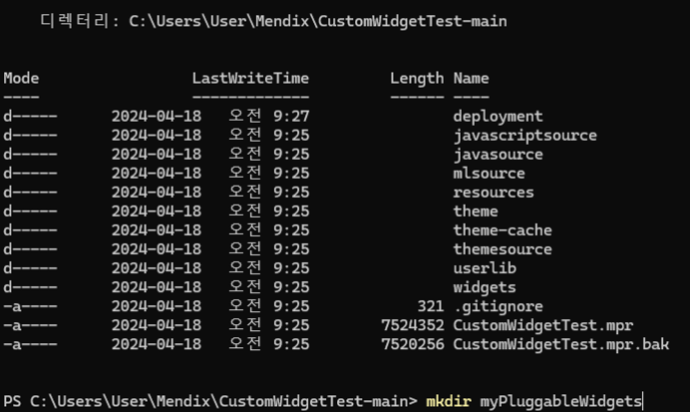
cd myPluggableWidgets 이동후에 yo @mendix/widget characterCounter YEOMAN명령어를 입력!!
아래와같이 해주면 YEOMAN이 @mendix/widget 의 프로젝트를 바로 만들어준다. Node를 사용해본사람이면 알텐데 Dependency 문제는 아주 속이터진다… 그런데 이렇게 명령어 한줄로 만들어준다니 너무좋다…
  __  ____   __            _     _            _
 |  \\\\/  \\\\ \\\\ / /           (_)   | |          | |
 | \\\\  / |\\\\ V /   __      ___  __| | ____  ___| |_
 | |\\\\/| | > <    \\\\ \\\\ /\\\\ / / |/ _  |/ _  |/ _ \\\\ __|
 | |  | |/ . \\\\    \\\\ V  V /| | (_| | (_| |  __/ |_
 |_|  |_/_/ \\\\_\\\\    \\\\_/\\\\_/ |_|\\\\__._|\\\\__. |\\\\___|\\\\__|
                                    __/ |
                                   |___/
 Widget Generator, version: 10.7.2
? What is the name of your widget? characterCounter
? Enter a description for your widget 입력을 카운트해주는 위젯
? Organization name Mendix
? Add a copyright © Mendix Technology BV 2022. All rights reserved.
? Add a license 0.0.1
? Initial version 1.0.0
? Author John
? Mendix project path ../..
? Which programming language do you want to use for the widget? TypeScript
? Which type of components do you want to use? Function Components
? Which type of widget are you developing? For web and hybrid mobile apps
? Which template do you want to use for the widget? Empty widget (recommended for more experienced developers)
? Add unit tests for the widget ? (recommended for Full Boilerplate) No
? Add End-to-end tests for the widget ? (recommended for Full Boilerplate) No
저렇게 명령어 입력을하고 기다리면 알아서 Widget전용의 프로젝트를 생성해준다.
그리고 생성이 끝났다면 npm run build 명령어를 통해서 Widget을 build해준다
{
  "name": "charactercounter",
  "widgetName": "CharacterCounter",
  "version": "1.0.0",
  "description": "입력을 카운트해주는 위젯",
  "copyright": "© Mendix Technology BV 2022. All rights reserved.",
  "author": "John",
  "engines": {
    "node": ">=16"
  },
  "license": "0.0.1",
  "config": {
    "projectPath": "../..",
    "mendixHost": "<http://localhost:8080>",
    "developmentPort": 3000
  },
  "packagePath": "mendix",
  "scripts": {
    "start": "pluggable-widgets-tools start:server",
    "dev": "pluggable-widgets-tools start:web",
    "build": "pluggable-widgets-tools build:web",
    "lint": "pluggable-widgets-tools lint",
    "lint:fix": "pluggable-widgets-tools lint:fix",
    "prerelease": "npm run lint",
    "release": "pluggable-widgets-tools release:web"
  },
  "devDependencies": {
    "@mendix/pluggable-widgets-tools": "^10.7.1",
    "@types/big.js": "^6.0.2"
  },
  "dependencies": {
    "classnames": "^2.2.6"
  },
  "resolutions": {
    "react": "18.2.0",
    "react-native": "0.72.7"
  },
  "overrides": {
    "react": "18.2.0",
    "react-native": "0.72.7"
  }
}
실제작업
위젯 폴더에 있는 xml의 Properties를 따라서 옵션이 생성된다!!
<!-- characterCounter\src\CharacterCounter.xml Mendix의 Properties -->
<!-- 우리가 자주보던 그 옵션이 맞다 General -->
<?xml version="1.0" encoding="utf-8"?>
<widget id="mendix.charactercounter.CharacterCounter" pluginWidget="true" needsEntityContext="true" offlineCapable="true"
        supportedPlatform="Web"
        xmlns="http://www.mendix.com/widget/1.0/" xmlns:xsi="http://www.w3.org/2001/XMLSchema-instance"
        xsi:schemaLocation="http://www.mendix.com/widget/1.0/ ../node_modules/mendix/custom_widget.xsd">
    <name>Character Counter</name>
    <description>입력을 카운트해주는 위젯</description>
    <icon/>
    <properties>
        <propertyGroup caption="General">
            <property key="content" type="widgets" required="false">
                <caption>content</caption>
                <description>콘텐츠 박스</description>
            </property>
	            <property key="maxLength" type="integer" defaultValue="10">
                <caption>maxLength</caption>
                <description>최대이름 길이</description>
            </property>
            <property key="age" type="widgets" required="false">
                <caption>age</caption>
                <description>나이</description>
            </property>
        </propertyGroup>
    </properties>
</widget>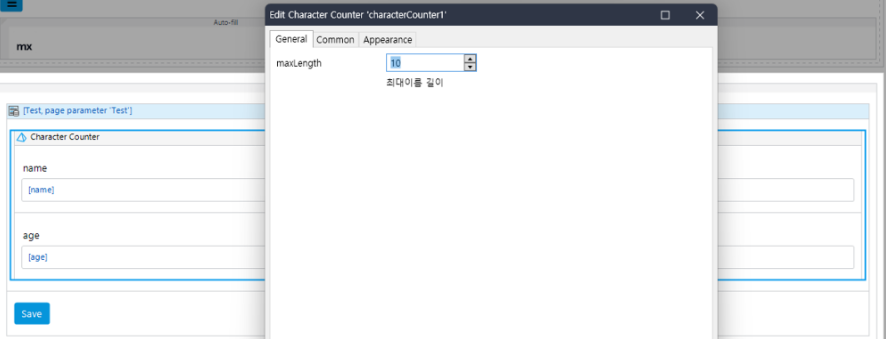
위젯은 바꾸고나면은 항상 npm run build 를 습관화 하자!!
그리고 변경됐으면 F4로 싱크를 맞추고 위젯을 우클릭해서 update해주면 끝!
일단 Widget의 기본 구조부터 살펴보겠다.
보통의 React파일구조와 같으며 한가지 차이점이라고 하면 xml을 사용한다는 것이다.
또한 typings를 본다면 CharacterCounterProps가있다 이 파일은 CharacterCounter.xml에 맞게 interface를 생성해준다
그래서 Component 등에서 가져다 사용하고 싶다면은 typings의 interface 를 확인해보면된다.
src
 ┣ components
 ┃ ┗ CharacterCounterComponent.tsx
 ┣ ui
 ┃ ┗ CharacterCounter.css
 ┣ CharacterCounter.tsx
 ┣ CharacterCounter.xml
 ┗ package.xml
 typings
 ┗ CharacterCounterProps.d.ts
.d.ts → 선언파일로 실제 실행 가능한 코드가 아니라, 컴파일러에 타입 정보를 알려주는 역할
.tsx → TypeScript를 사용하는 React 컴포넌트 파일에서 사용
아래부터는 소스코드를 나열해보겠다.
아래의 소스코드는 Component 만 불러주는 역할이다. 그래서 실제 기능을 보기위해서는 Component 를 보면된다.
import { ReactElement, createElement } from "react";
import { CharacterCounterComponent } from "./components/CharacterCounterComponent";

import { CharacterCounterContainerProps } from "../typings/CharacterCounterProps";

import "./ui/CharacterCounter.css";

export function CharacterCounter({ content, maxLength, age }: CharacterCounterContainerProps): ReactElement {
    return <CharacterCounterComponent content={content} maxLength={maxLength} name={""} class={""} age={age} />;
}
import { ReactElement, createElement, useState, useRef, useEffect } from "react";
import { CharacterCounterContainerProps } from "../../typings/CharacterCounterProps";
import "../ui/CharacterCounter.css";

export function CharacterCounterComponent({ content, maxLength, age }: CharacterCounterContainerProps): ReactElement {
    const [nameInput, setNameInput] = useState<string>("");
    const [ageInput, setAgeInput] = useState<number>(0);
    const nameInputRef = useRef<HTMLInputElement>(null); // 이름 입력란을 위한 ref
    const ageInputRef = useRef<HTMLInputElement>(null); // 나이 입력란을 위한 ref

    const onInputChangeName = (e: Event): void => {
        if (e) {
            setNameInput((e.target as HTMLInputElement).value);
        }
    };
    const onInputChangeAge = (e: Event): void => {
        if (e) {
            setAgeInput(parseInt((e.target as HTMLInputElement).value, 10) || 0);
        }
    };
    const charLimitStyles = (): string => {
        const charLength = nameInput.length;
        const charLimit = maxLength ? maxLength : 0;
        if (charLength > charLimit * 0.8) {
            return "character_counter_80_percent";
        } else if (charLength > charLimit * 0.6) {
            return "character_counter_60_percent";
        }
        return "";
    };

    useEffect(() => {
        let eventListenerName: Element;
        let eventListenerAge: Element;
        if (nameInputRef.current && ageInputRef.current) {
            eventListenerName = nameInputRef.current;
            eventListenerName.addEventListener("input", onInputChangeName);
            eventListenerAge = ageInputRef.current;
            eventListenerAge.addEventListener("input", onInputChangeAge);
        }
        // 클린업 리소스를 정리
        return () => {
            if (eventListenerName) {
                eventListenerName.removeEventListener("input", onInputChangeName);
            }
            if (eventListenerAge) {
                eventListenerAge.removeEventListener("input", onInputChangeAge);
            }
        };
    }, []);
    console.log("ageInput: " + ageInput);
    return (
        <div className={`${charLimitStyles()} character_counter`}>
            <div ref={nameInputRef}>{content}</div>
            <span>
                {nameInput.length} / {maxLength}
            </span>
            <div ref={ageInputRef}>{age}</div>
        </div>
    );
}
/*
Place your custom CSS here
*/
.widget-hello-world {

}

.character_counter > span{
    color: rgb(0, 0, 110);
}
.character_counter_80_percent input{
    border-color: red !important;
}
.character_counter_80_percent span{
    color: red!important;
}

.character_counter_60_percent input{
    border-color: pink!important;
}
.character_counter_60_percent span{
    color: pink!important;
}
<?xml version="1.0" encoding="utf-8"?>
<widget id="mendix.charactercounter.CharacterCounter" pluginWidget="true" needsEntityContext="true" offlineCapable="true"
        supportedPlatform="Web"
        xmlns="http://www.mendix.com/widget/1.0/" xmlns:xsi="http://www.w3.org/2001/XMLSchema-instance"
        xsi:schemaLocation="http://www.mendix.com/widget/1.0/ ../node_modules/mendix/custom_widget.xsd">
    <name>Character Counter</name>
    <description>입력을 카운트해주는 위젯</description>
    <icon/>
    <properties>
        <propertyGroup caption="General">
            <property key="content" type="widgets" required="false">
                <caption>content</caption>
                <description>콘텐츠 박스</description>
            </property>
            <property key="maxLength" type="integer" defaultValue="10">
                <caption>maxLength</caption>
                <description>최대이름 길이</description>
            </property>
            <property key="age" type="widgets" required="false">
                <caption>age</caption>
                <description>나이</description>
            </property>
        </propertyGroup>
    </properties>
</widget>
/**
* This file was generated from CharacterCounter.xml
* WARNING: All changes made to this file will be overwritten
* @author Mendix Widgets Framework Team
*/
import { ComponentType, CSSProperties, ReactNode } from "react";
export interface CharacterCounterContainerProps {
name: string;
class: string;
style?: CSSProperties;
tabIndex?: number;
content?: ReactNode;
maxLength: number;
age?: ReactNode;
}
export interface CharacterCounterPreviewProps {
/**
* @deprecated Deprecated since version 9.18.0. Please use class property instead.
*/
className: string;
class: string;
style: string;
styleObject?: CSSProperties;
readOnly: boolean;
content: { widgetCount: number; renderer: ComponentType<{ children: ReactNode; caption?: string }> };
maxLength: number | null;
age: { widgetCount: number; renderer: ComponentType<{ children: ReactNode; caption?: string }> };
}
추가사항
위에 까지의 내용은 Advanced 에 있는 내용이다. 하지만… 정말 예제는 예제이기 때문에 이번에는 Grid.js 를 사용해서 Widget에 Library를 추가해볼 것이다.
'Mendix' 카테고리의 다른 글
| [Mendix] selectBox Widget 구현 (0) | 2024.05.14 |
|---|---|
| [Mendix] React Widget with Library (0) | 2024.05.14 |
| [Mendix] multi file upload (0) | 2024.05.14 |
| [Mendix] 커스텀로그인 (1) | 2024.05.14 |
| [Mendix] data Import Expose (0) | 2024.05.14 |


